Your whole school, in one system.
Ajyal brings admissions and enrolment, timetables, attendance and lesson logs, grades and certificates, finance and school screens into one place. Everything is built inside the system, and importing from aSc or Excel is an extra for those who want it. Work from any computer or phone.
In Arabic, Hebrew and English, and installs on a phone straight from the browser
A glimpse of the system, as your team sees it
These are only a few of Ajyal's screens, a small part of what it does. Real captures from a sample school with invented names: pick a screen to see what happens there, and select any picture to enlarge it.


Timetable
Build the timetable on a live grid
The timetable is built and edited on a clear grid showing each class’s week and the lessons still to place, with no paperwork and no outside programs.
- Import, export and print from the same screen
- Automatic and manual timetable building
Our mission
We see a school through human eyes, not through a price tag
Many things set us apart, but the most important is that we look at a school, and work for it, with human eyes, not through a price tag. Many systems charge a school for every student, so the cost grows with each new student until it becomes a burden; the goal of the system becomes making money, with no human dimension and no moral vision, and many schools that needed it most stay away. We do not want to treat a school as a place to make money without a purpose or principles; when principles and moral vision are lost, the work is emptied of its higher purpose to the very end.
Our mission is bigger and higher than that: when education loses its balance it loses its meaning and its purpose, and we see ourselves as part of that human mission carried forward. So we build Ajyal to lighten the teacher's load, not to watch over them; to give leadership time for students, not for paperwork; to keep parents close to their children; and to keep our first goal in sight: building a bright future for our children.
Teachers first
Tools that shorten their daily work instead of adding to it, so their time goes back to their students.
A student is a person, not a number
We show what helps you understand and support a student, not what turns them into a number in a table.
A partnership, not a deal
We listen to schools and develop with them, and we measure our success by what changes for them, not by what we earn from them.
Coming soon to Ajyal
What we are building now will make Ajyal unlike any other platform
What you see today is only the beginning. In our lab, ideas are being built right now that will make the platform truly distinctive, unique at a level never seen before among education platforms. We will not reveal everything yet, but we promise that what is coming is worth the wait.
- In the making
A teacher's day, lighter than ever
New tools that work quietly beside the teacher, turning what took hours into minutes, so their time goes back to their students.
- In the lab
A platform that understands your school
Intelligent capabilities that catch what the eye misses in attendance, grades and behaviour, and alert you at the right moment, before a signal becomes a problem.
- Soon
Home and school, closer than ever
A new experience that makes following your children clearer and warmer, bringing parents, students and teachers together around one goal.
- A secret, not yet revealed
Something no platform has done before
We are working on an idea that is unique at a level never seen before among platforms. Watch this space: it will be announced here first.
Everything new reaches schools automatically with updates, with no move and no new setup.
Be the first to knowEverything a school runs on, connected
Choose a module to see what it does. The data is shared: the student admitted today is the same student in the timetable, attendance, grades and finance.
- Students & learning
- Attendance & timetable
- Families & communication
- Administration & operations
- Resources & services
- Data

Student lifecycle
One record follows each student from the admission request to the alumni file: clear admission stages, enrolment, transfers, promotion and graduation, with every move kept on a permanent timeline.
- Admission requests with stages and required documents per grade
- Bulk promotion with a preview before it runs
- Duplicate detection that never merges on its own
- The student record across years, even after graduation
- Final grade 100%87
- Term 1 40%
- Exams 50%
- Tasks 30%
- Participation 20%
- Term 2 60%
- Exams 50%
- Tasks 30%
- Participation 20%
- Term 1 40%
Tree-based grading
Grades calculated exactly the way your school wants: exams, tasks, participation, terms and a final grade, with weights worked out for you. The system makes sure the calculation is right before a grade reaches a student.
- A flexible grading scheme for every class, subject or teacher
- Clear grade states: absent, exempt, missing, cancelled
- Entry monitor: who has entered grades and who is late
- Report rounds with closing deadlines
- Maths94
- Arabic88
- Science91
- English85
- Hebrew97

Certificate studio
Design the certificate your way: a free designer, Word templates or a gallery of ready designs. Issue for every class at once as one PDF or a file per class, in Arabic, Hebrew and English.
- Monthly, term, year-end and up-to-today certificates
- Trusted certificates anyone can verify
- A list of who was not issued, with the reason
- Issued files never change afterwards
- 1Choose the right answer4
- 2Fill in the blank3
- 3True or false3
Exams and online forms
Exams, quizzes, homework and surveys that are easy to build and checked before publishing, plus a tidy exam timetable with rooms and invigilators and no clashes.
- Private or shared question banks
- Reuse assessments as templates
- Import and export questions
- Lesson
- Video
- File
E-learning and homework
Courses for each class and subject with units, lessons, videos and files, and homework that students hand in while teachers and parents follow. Whatever is published reaches the student portal at once.
- Draft, then publish to students, and archive at year end
- Due dates visible to students and parents
- 1Joined from the lesson link24/26
- 2Attendance code4821
- 3Meeting minutes41/45
Distance learning
Switch the whole school, grade levels or classes to remote learning for chosen days, and every student joins their lesson from the timetable with a Zoom, Google Meet, Teams or any other link. Attendance is proposed from joining, an attendance code and meeting minutes, and the teacher confirms it.
- Live lessons, self-study or alternating halves of the class
- Live follow-up of every remote lesson now
- Live questions and forms before and after the lesson
- Protected online exams
- 96%Attendance
- 81%Achievement
- 92%Lesson logs
Pedagogy and early warning
An executive view of attendance, achievement and lesson logs, and early-warning rules your school defines, whose alerts become follow-up cases with actions, owners and dates. Each teacher sees only their own classes.
- Achievement and progress by subject and class
- A complete pedagogical profile for each student
- Exportable reports
- Alert
- Referral
- Plan
- Follow-up
Student support and counselling
Support and counselling cases fed by referrals from teachers and early warnings, with a plan, an owner and review dates, and confidential notes only authorised staff can read.
- Refer from an alert to counselling in one step
- A full record of every action

Attendance tracking
A daily board of each teacher’s lessons across all classes, attendance that fits each school’s policy, clear reports that show the full picture, and a message to parents on absence or lateness.
- Follow-up of lessons not yet recorded
- Consecutive-absence reports
- History stays right after a transfer or archive
- Maths · Period 2Documented
- Science · Period 3Documented
- English · Period 5Missing notes

Lesson documentation
The daily lesson log with topics and attendance, reviewed and approved by the person in charge. Yearly subject plans show where each teacher has reached, with a reminder when a lesson is left unrecorded.
- A recording policy that suits each school
- Teachers cannot approve their own logs
- A rich lesson reports centre
- 1Week 1 · Fractions✓
- 2Week 2 · Ratio✓
- 3Week 3 · Proportion…
Annual plans and lesson preparation
An annual plan for every subject and section with its weeks and items, copied to other sections with a preview first. Daily preparation and the lesson log show that section’s own plan items, even for a substitute teacher.
- Copy a plan to other sections or groups
- Progress from the lessons actually taught
- Attendance reminders for teachers
Timetable building
The whole timetable is built inside Ajyal, with no outside program: a complete timetable that respects the needs of teachers, classes and rooms, and arrives ready for review before it goes live.
- Easy drag-and-drop editing
- No clashes in teachers’ lessons
- Rotating weekly timetables and a print centre
Teaching loads and periods
A yearly load for each teacher with the reductions they are due, and a clear comparison with the real timetable showing missing and extra lessons and who is over their load.
- Lesson times set up in minutes
- Protection against accidental deletion
- Detailed Excel export and print

Teaching groups
Split a class into groups for one subject, fixed or rotating between teachers, or bring students from different classes into a level group. Periods and loads are counted correctly for parallel groups.
- Fixed groups or a defined rotation
- One-off swaps and exceptions
- General groups for administration and messages

Buildings and classes
Buildings, floors and rooms by type and capacity, with a home room for every class. Arrange classes as you like, and keep track of building maintenance and periodic checks.
- Rooms linked to teachers and subjects
- A class room never carries over to a new year silently
- Maintenance requests and work orders
Parent and student portal
Parents and students see only what concerns them, on a phone or a computer: attendance, grades and certificates, the weekly timetable, homework, exams and the calendar. Parents sign consents, follow their account and stay in touch with the school.
- Several children in one account
- Library, transport and voting from the same portal
- Secure sign-up invitations for parents
- App notificationYour child is absent today
- SMSTerm grades published
- EmailReminder: payment due

Alerts and notifications
Messages to students, parents and staff by portal inbox, email, SMS and phone notifications, plus automatic events switched on per channel. Early warnings are referred to counselling with an owner and a review date.
- Quiet hours and a daily digest
- Text messages from the system and per-school email
- Follow-up until each message arrives
E-consents and voting
Consent forms for a trip, an activity or a document that parents sign on their phone while the school follows replies live, with a paper copy for anyone who needs one. Plus elections and polls with one-time links and clear results.
- Send to a class, a grade level or the whole school
- Ready templates and reply reports
- 1Star rating★★★★★
- 2Scale 0–10NPS
- 3Pick a student from the class9A
Forms and surveys
Forms, surveys, quizzes and registrations with a wide range of question types and conditional logic, and plenty of themes, Arabic fonts and ready templates. Send them to staff, or to students and parents from the school’s own data, or through a public link and QR code.
- Quizzes with automatic marking and partial credit
- Chart summaries, export and reminders to those who have not answered
- A public link protected from automated submissions
- Linked to remote lessons
- 108:15Free
- 209:00Lesson
- 310:30Your request
Parent–teacher meetings
A parent books a meeting with one of their child’s teachers at a time that is really free: times taken by lessons, cover, exams or leave show as closed automatically. In person, a call or a video meeting, approved by the teacher.
- Holidays show as closed and cannot be booked
- A daily limit and a gap after lessons

School screens and bell
Connect any screen in a minute and show the current lesson, substitutions, exams, the bell and announcements, with no personal student data. Emergency broadcasts reach the screens within seconds, and the bell follows the school calendar.
- Zoned layouts, a news ticker and the current and next period
- Teachers’ content is reviewed before it shows
- Remote control of every screen
- Tuition3,200
- Transport1,450
- Activities600
- Sibling discount−320
- Paid−3,930

Accounting and finance
Complete, accurate school accounting: invoices, receipts, instalments and discounts, a cashier till, and parents’ payments reviewed and turned into a receipt. Every number in its place, with no mistakes and no duplicates.
- Oversight of discounts and refunds
- Debt ageing and collections by day and method
- Financial periods locked once approved
Suggested cover
- Mr Walker · free
- Ms Green · same subject

Staff, leave and cover
A file for every staff member and teacher with roles, account and load, leave requests with an approval path, and smart suggestions for cover lessons.
- Import staff from Excel with a preview
- Approvals with stages, deadlines and a decision trail
- AhmadPresent★★★★★
- LeenPresent★★★★
- MohammadLate★★★
- JoudPresent★★★★★

Vocational schools and work-based learning
Work groups per employer with fixed days and hours, and a phone portal where employers record attendance and ratings in one tap. Job, salary, insurance and work-permit details, with alerts for absence and expired insurance.
- Easy, secure sign-in for employers from their phone
- Save attendance for every group in one step
- Reports by student, class and employer
- Signed in
- Grade changed
- List exported
Permissions and security
Every user sees only what their role needs, with temporary delegation when required, two-step verification, a full log of actions and encrypted backups. And each school’s data is completely separate from the rest.
- An operations log centre
- Backups you can rely on
- Draft
- Review
- Approval
- Acknowledged
Minutes, decisions and records
Meeting minutes, numbered decisions and records of calls, meetings and incidents, with a running yearly number. Bodies and committees with members and quorum, review, approval and acknowledgement, and a confidentiality level for every record.
- Tasks from decisions with an owner and a date
- Search across texts, items and decisions
- Bus route 3On its way
- Book loanUntil 14 Nov
- Scouts activity18 signed up
- Repair requestIn progress
School services
Transport with routes, trips and capacity, the library and textbooks, activities and trips with registration and safety, facilities and maintenance, and asset custody with clash-free lab booking. All on the school's own data.
- No trip with an expired licence, no over-capacity
- Lending, reservations and textbook handout
- Activity programmes with registration, attendance and results
- LaptopUntil year end
- Loaner deviceFor one day
- Maths textbookReturned
- CameraReserved
Lending and custody
Lend anything the school owns: books, laptops and tablets for a day, a year or the student’s whole stay, loaner devices, equipment and machines. Custom categories and fields, signed agreements, barcode labels, scan-based stocktaking and fees.
- Hand out to a whole class by scanning
- Parent signature from the portal
- Waiting lists and reservations
- Electrical dept.Awaiting approval
- CleaningDelivered
- LaboratoryBeing purchased
- ComputersApproved
School requisitions
Every department orders what it needs: vocational majors, cleaning, maintenance, labs, computers and stationery. Members come from staff, jobs and teachers, with an approval, purchasing and delivery path, and stock and a budget per department.
- Suggested departments in one click
- Consumption and budget tracking
- 1Early leave · Sara 9AK7Q2M9
- 2Late entry · Ahmad 7BR4T8LA
- 3Visitor · parentV2N6PE
Security, guarding and the gate
A digital pass instead of a paper note for a student leaving, arriving late or a visitor, sent instantly to the gate guard with a code. The guard records exits and entries with one tap on the phone, matches the parent’s ID without seeing it, and parents are notified.
- Incident and patrol log
- A screen designed for the phone at the gate

Import from aSc TimeTables
An option for schools that use aSc: one file brings your whole school into Ajyal, from buildings and classes to teachers and lessons, and then you carry on inside Ajyal.
- Carries over even complex lessons
- Teacher accounts ready straight away
- Safe undo
- Day names in Arabic, Hebrew or English
- 312New
- 1,140Updated
- 6To review
Smart import
Upload your file as it is, and the system recognises what already exists and adds what is new without overwriting your data. You see what will change before it runs, and you can undo.
- No need to rearrange your file
- Review new classes before they are created
- Importing with the least possible effort

Import and export everywhere
Ready Excel templates for grades, attendance, students, parents and staff: export, fill in and import safely, without losing existing data, and with undo.
- Grades in the system’s template or your own file
- Daily or per-period attendance for any range
- Lists export to Excel
And that is not all
Ajyal holds far more than this page shows
What you have seen so far is only the highlights. Inside Ajyal there are more than 130 screens and tools covering the whole school day, including entire areas we have not talked about here yet: reports of every kind, daily lesson preparation, follow-up and auditing, and much more. Here is a glimpse:
- 130+screens and tools
- 180+written help guides
- 20+connected systems on one set of data
- 3full languages
Reports of every kind
- A reports centre you build yourself
- Attendance reports with charts for any period
- Grade sheets, averages and rankings
- Academic analysis and term-to-term comparison
- Ready financial reports
- Reports emailed to you automatically on schedule
Daily lesson preparation
- A plan for every lesson with goals, methods and assessment
- Ready lesson-flow templates
- Plan readiness at a glance
- Review and approval by leaders
- Reuse plans with ease
- Reflection after the lesson, linked to the yearly plan
Day-to-day follow-up
- A task centre for gaps, with an owner and a date
- Lesson recording follow-up
- Grade entry tracking by subject and teacher
- A daily operations centre on one screen
- Dedicated tools for homeroom teachers
- Intervention and follow-up cases
Auditing and oversight
- A clear activity log: who did what, and when
- An audit log that cannot be changed or deleted
- Review and approval of lesson logs
- Oversight of large discounts and refunds
- A data quality centre
- Periods and years locked once approved
Assessment in depth
- Flexible academic settings for each school
- Standards and skills tracking
- Report card comments and conduct ratings with ready-made phrases
- Full control over where certificate grades come from
- Positive and negative behaviour tracking
- Smart signs of who needs support or enrichment, with the decision left to you
Administration
- Ready school roles with their permissions, which you can adjust as you like
- Assign jobs to staff and their permissions follow automatically
- Managing the school year from start to finish
- School hours and the calendar
- Secure invitations for parents and students
- Ready designs for invoices, receipts and statements
All of it works together on the same data, and each user reaches it according to their job.
Ask for a full tour of the systemThe student journey, from first request to after graduation
Every stage writes to the same student record, so nothing is lost between years or departments.
Admission
Admission and transfer requests with stages and documents, an interview or waiting list when needed.
Pending enrollment
An accepted request becomes a student exactly once, and the details and documents are completed before activation.
Active
In a class and groups all year: attendance, lesson logs, grades, report cards and messages to parents.
Promotion / repeat
At the end of every school year: bulk promotion with a preview, or repeating a grade.
Transfer / withdrawal
A move to another class or school, or a recorded withdrawal, with the student record kept in full.
Graduation and alumni
Graduation recorded with the certificate number, and an alumni file with studies, work and contact details.
The whole school timetable is built inside Ajyal
Your school needs no outside scheduling program. From the first setting to printing the timetables, everything is inside Ajyal: resources, teaching loads and teachers’ needs, and a complete timetable built automatically or by hand that goes straight to teachers, attendance, the screens and the bell.
Already have your timetable in aSc TimeTables? We bring it into Ajyal with one file, and you carry on from here.
- 07:55Period 1 starts
- 08:40Period 1 ends
- 10:15BreakNext
- 10:35Break ends
- 13:20End of the day
School bell
The bell rings on Ajyal's times, with no manual setup
Our bell program, Smart School Bell Pro, runs on a computer at school and connects to Ajyal just once. From then on it rings on the lesson, break, school-day and holiday times exactly as they are in the system, and updates itself whenever something changes. No timetables copied by hand, and no bell on a holiday.
Linked with one code
A quick, secure one-time connection, and you can connect more than one computer: the main building, the office and more.
Times from the system
Lesson times, school days, holidays and special days come from the school calendar itself, and you can see any day’s bells ahead of time.
Flexible ring rules
Rings for the start and end of a period and the end of a break, an earlier bell by minutes, a sound for each kind, and silence on part-time days.
Remote control and status
Test or update the bell from anywhere, and check on every computer from inside Ajyal.
Emergencies with the screens
An emergency broadcast from the digital screens also puts the bell into emergency mode, with an emergency sound the school chooses.
Works even offline
If the connection drops, the bell keeps ringing as usual and updates itself the moment the internet is back.


One screen, three languages
Every screen in Ajyal works in Arabic and Hebrew from right to left, and in English from left to right. Each user picks the interface language, and each school enters its data in its own language.
This is the same timetable-building screen in three schools: in Arabic, Hebrew and English.
Make it yours
Ajyal in your colours and style
Every user chooses how the system looks on their device without touching data or permissions, and the school sets its default language. Changes apply at once and are kept.
Dozens of colours
Ready-made colour identities, or your own colours exactly as you want them.
Icons in many styles
Different picture styles that change instantly across menus, buttons and cards.
A drawing for every section
Every section has its own colourful drawing, in many colour sets each user can choose from, or icons only.
Icon frames and corners
Many icon frame shapes, and soft or sharp corners across the whole system.
Light, dark and auto
Auto follows the device setting, day and night.
Sign-in page pictures
Illustrations and a calm background for the sign-in page.
A school language and a language per user
A default language for the school, and each user keeps their own language in their account on any device.
A complete system in the pocket of the school, parents and students
Leadership, teachers, parents and students work from their phones with the same screens laid out for them, and the system installs on the home screen straight from the browser, with instant notifications.
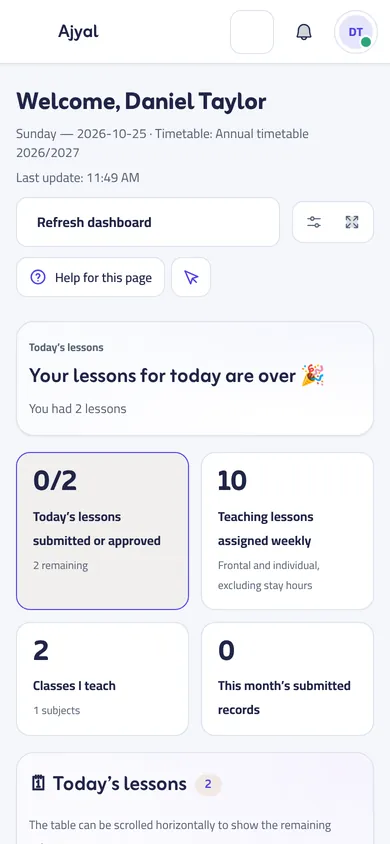
Teacher: today's lessons 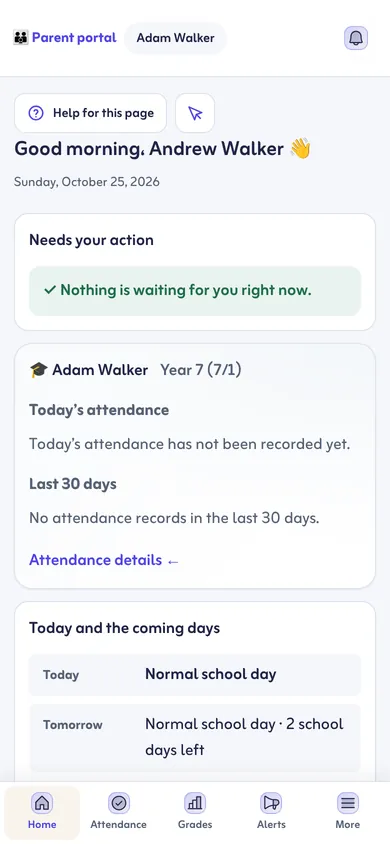
Parents: the parent portal 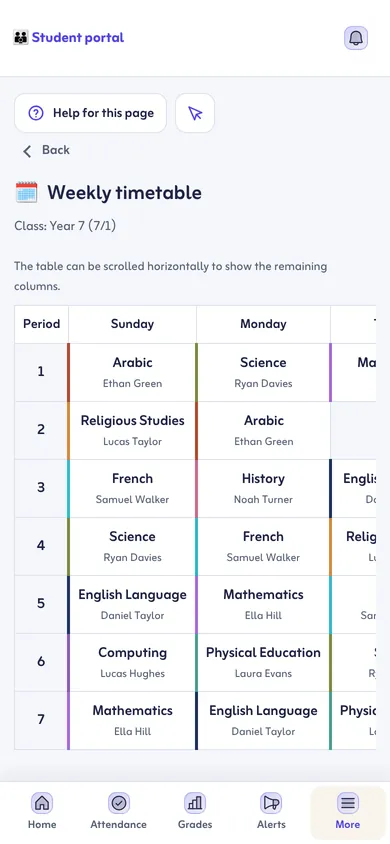
Student: the weekly timetable 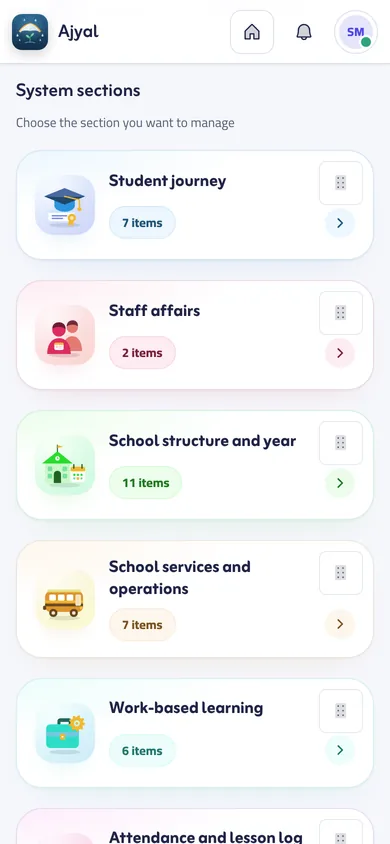
Leadership: home


- Signed in
- Grade changed
- List exported
Security
Two layers of protection, and access only as needed
Account protection doesn't stop at the password: two-step verification is available for every kind of account, and can be required for sensitive admin accounts. And every user sees only what their job needs.
Two-step verification
After the password, a code from an authenticator app on the phone is required, so a stolen password is not enough to get in.
Recovery codes
A safe way back into the account if the phone is lost.
Permissions by job
Each role has its own permissions, so every user sees only what their work needs.
Temporary authorisation
Temporary access when needed, approved by someone in charge, that ends on its own.
An audit log no one can change
Every sensitive action is recorded, and the record cannot be changed or deleted.
Encrypted backups
Encrypted backups that we regularly check really work.
Ajyal: Daniel was recorded absent today in the first period.
- Class
- Grade
- Group
- School
- Staff
Text messages
SMS that reaches parents on time
Text messages from the system to parents, students and staff: to a class, a grade, a group or the whole school, automatic messages from attendance, and a balance and log to follow, alongside phone notifications and email.
Send to whoever you choose
To a class, a grade, a group, the whole school or the staff, and to parents, students or both, from one screen.
Automatic absence and lateness
An automatic message when an absence or lateness is recorded, to parents, the student or both, from a template the school prepares.
Balance and low-balance alert
Balance tracking with a warning before it runs out, plus a full log and clear sending statistics.
Quiet hours and follow-up
No messages during quiet hours, a daily digest for those who want it, and follow-up until each message arrives.
Notifications and email
The same notice arrives on the phone instantly, and by email in the school’s name.
Sign-in code by text
In vocational schools, employers sign in easily and securely with a message sent to their phone.
- This page
- Search
- Ask the assistant
- 1Open your lesson from today’s list
- 2Mark everyone present in one tap
- 3Change only the exceptions, then save
Help
An advanced, complete help system on every page
No printed manual, and no waiting for someone to explain. Every page in Ajyal has a “Help for this page” button that opens a guide our team wrote for that exact page, in plain language, in Arabic, Hebrew and English.
A guide for every page
What the page does and how to work in it, for more than 180 pages.
Explain any button or field
Turn on explain mode and tap anything to read what it does, without running it.
Show me where
From the guide straight to the button or field on the page, highlighted for you.
Why isn’t this available to me?
Explains the reason (access, a feature that is off, or the record’s state) and what to do next.
If a message appears
Every message has a plain explanation and a “What to do” step.
Search and an assistant
Search all guides or ask the assistant; the answer comes from our verified guides.
Guided tours and a help studio
Step-by-step tours, and the school can write its own guides for its staff.
Our support team, right there
Write to us about a problem or an idea right from help, and follow the reply inside Ajyal.
Why Ajyal?
Most schools run separate programs with Excel sheets in between. Ajyal replaces them with one system that stops mistakes before they happen. A look can be copied; what cannot be copied is an Ajyal that keeps growing with its schools, and a team that stays with you until everything works.
 Ajyal | Typical setups | |
|---|---|---|
| Data | One system: students, timetable, grades and finance are linked | Separate programs with spreadsheets in between |
| Languages | Full Arabic, Hebrew and English, with certificates in the right direction | One language or a partial translation |
| Getting started | A quick start in clear steps, or an easy move of your existing data | Long manual data entry |
| Timetable | Built entirely inside the system, or imported from aSc in one step | A separate scheduling program, then copying by hand |
| Grades | Accurate grades that never come out wrong | A fixed template or a calculation in an outside sheet |
| Vocational schools | Work groups, employer portal, permits and insurance | Usually outside the school system |
| Screens and bell | Take the timetable and calendar from the system | Devices and programs updated by hand |
| Mistake prevention | The system stops mistakes before they happen | Found after they happen |
| Import and export | Import and export across most of the system, safely and with a preview first | Copying by hand between programs |
| Development | Continuous development led by schools’ feedback, with everything new arriving automatically and no migration | Few, slow updates |
| Security | Two-step sign-in, a tamper-evident audit log and encrypted backups | Varies from program to program |
- Student NameStudent name
- ClassClass
- Parent PhoneGuardian phone
- 132 new
- 4 updates
- 0 auto-merged
Moving to Ajyal
Moving to Ajyal is easier than you think
Whatever system you use today, we move your data to Ajyal with as little effort as possible, and stay with you step by step until the whole school runs smoothly on the new system.
From any Excel or CSV file
Upload your file as it is, with no rearranging beforehand.
Students, staff, grades and attendance
All imported with the system templates or with your own files as they are, together with parents and contact details.
The timetable from aSc
For schools on aSc: one file brings over the whole timetable.
A preview before anything changes
You see what will be added and changed before saving, so there are no surprises.
Safe undo
An import can be undone safely, without losing any data.
Full support along the way
Our team follows the move with you until the first school day on Ajyal, and checks the data with you.
And more
Three languages
Each user picks a language; a translation studio with review.
On the phone like an app
Installs from the browser on the home screen, with notifications and drafts kept when the connection drops.
Built-in help
Help on every page and guided tours.
Approval workflows
Stages, deadlines and a decision trail.
Leave and cover
Smart suggestions for cover lessons.
Transport
Routes, trips and capacity; no trip with an expired licence.
Exams
Rooms, invigilators and clash checks.
Library and textbooks
Lending, reservations and textbook handout.
Assets and labs
Asset custody and clash-free lab booking.
Voting and elections
Secure elections and polls with clear results.
E-consents
Parents sign on their phone; the school follows live.
Data quality
Duplicates and gaps found, with a preview before fixing.
Year rollover
A smooth move from one year to the next.
School onboarding
Step-by-step setup with readiness checks.
School calendar
Holidays, events and special days, shown on the screens and followed by the bell.
Annual plans
A yearly plan for each subject, tracked for each class or group.
Announcements and messages
Announcements for chosen audiences, and one centre for messages and notifications.
Ideas and reports
Users send an idea or a problem with a screenshot and follow the reply inside the system.
Printing and reports
Print lists, timetables and certificates, with reports ready to export to Excel and PDF.
Automatic updates
New versions arrive by themselves, and users choose when to apply them after saving their work.
Questions
Do we need aSc or another scheduling program?
No. The whole timetable is built inside Ajyal, from the first setting to printing, automatically or by hand.
Can we bring our aSc timetable?
Yes. We bring your timetable from aSc TimeTables into Ajyal with one file, with a preview first and undo, and then you carry on inside Ajyal.
Do we need a server at school?
No. Ajyal works in the browser on computers and phones, and it can be installed on a phone like an app.
Is our data kept apart from other schools?
Yes. Each school's data is isolated, with an audit log and encrypted backups.
Does it suit vocational schools?
Yes. It has a full work-based learning system: employer groups, an attendance and rating portal, work permits and insurance.
We have a suggestion or an idea for something new. Can we send it to you?
Of course, and that is exactly what we hope for from every one of our users. Send the idea from "Support and help" inside the system or from the contact page; every suggestion is read and studied, and you can follow it under "My requests and replies".
I found a problem in the system. Should I tell you?
Yes, and please do not wait. This is what sets us apart more than anything: we look for these reports with great care, because reported problems are the first reason any system gets better. Tell us through "Report a problem" inside the system, with a screenshot if you can, and the platform team will follow it with you until it is solved.
We use another system today. Is moving to you hard?
Easier than you think. Export your data from your current system to Excel, and Ajyal takes it as it is and shows what will change before saving. Our team stays with you through the whole move until the school runs smoothly on Ajyal.
Ready to see Ajyal with your school's data?
Send a service request and we will arrange a demo and a start plan with you.